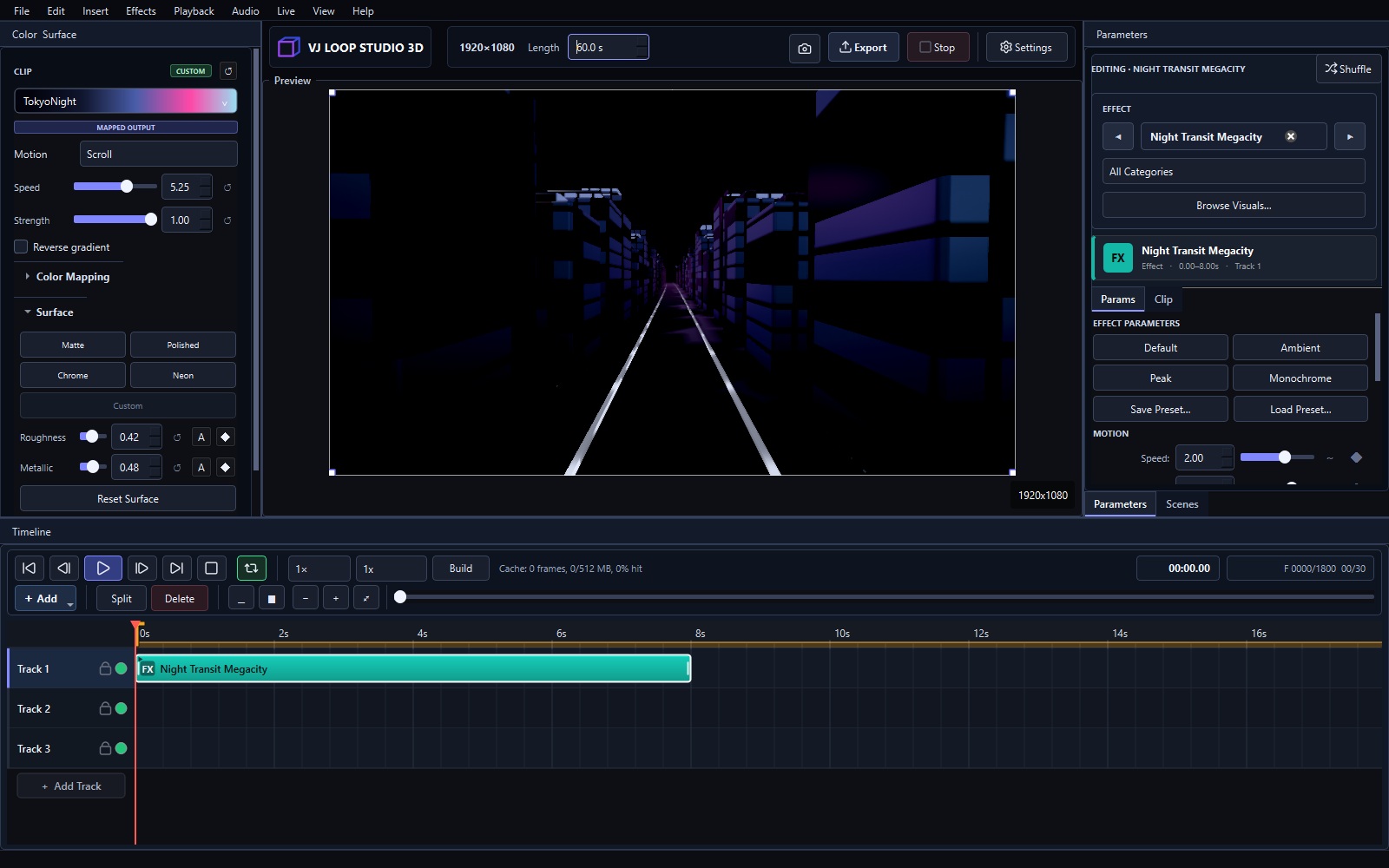
VJ loops are short, seamlessly repeating video clips used by DJs, VJs, event producers, and visual artists to create real-time visual performances. A VJ loop generator creates these loops from mathematical effects, generative art, or pre-rendered sequences. VJ Loop Studio 3D is a Windows VJ loop generator with 124 built-in effects, audio-reactive controls, and production-ready video export.
VJ loops at a glance
| What a VJ loop is | A short video clip whose last frame continues into its first, so it repeats with no visible cut |
|---|---|
| Typical length | 4–30 seconds, matched to a bar count at the set’s tempo |
| Where they are used | Club and festival screens, LED walls, projection mapping, streams, installations |
| How they are made here | 124 GPU effects on a multi-track timeline, rendered to video or sent live |
| Delivery | MP4, MKV, AVI, MOV, GIF up to 8K — or live via Spout and NDI |
| Platform | Windows 10/11 (64-bit), €99 (+VAT) one-time |
Start with a Visual System, Not a Fixed Clip
Choose an effect from one of eight groups, then adjust its motion, camera, palette, material, lighting, and effect-specific parameters. Because the visuals are generated inside the application, each project can be tuned for a specific stage, screen, mood, or track.
Build a Complete Sequence
The timeline brings effects, models, video, images, overlays, text, lyrics, and audio together. Keyframes, fades, transforms, blend modes, work areas, and scene timing make it possible to turn an idea into a reusable loop or longer composition.
Make Motion Respond to Sound
Selected parameters can react to RMS, bass, mid, treble, and beat features. Response controls let you tune thresholds, smoothing, inversion, and modulation shape so the movement supports the music instead of simply flashing at it.
Export for the Next Step
Render MP4, MKV, or AVI files at project-defined dimensions and frame rates. Use the result in compatible VJ software, editors, media servers, LED workflows, streams, installations, or social content.
VJ Loop Studio 3D is available for 64-bit Windows 10 and Windows 11.
Frequently asked questions
- What is a VJ loop?
- A VJ loop is a short video clip built so that its final frame continues seamlessly into its first, letting it repeat indefinitely without a visible cut. VJs play them behind DJs and live acts, on club screens, LED walls, and projection-mapped surfaces.
- How long should a VJ loop be?
- Long enough not to feel repetitive and short enough to stay in memory — 4 to 30 seconds is typical. Matching the length to a whole number of bars at the set’s tempo makes the loop point land on a beat, where nobody notices it.
- What software do VJs use to make loops?
- Generators create the visuals and mixers play them back. VJ Loop Studio 3D is a generator: it produces original loops from GPU effects and renders them to video, or feeds them live to a mixer such as Resolume or an encoder such as OBS over Spout or NDI.
- Do I need to buy VJ loop packs?
- Not if you generate your own. Loop packs are pre-rendered clips that many VJs use; generating them yourself means the visuals are unique to your set, can be matched to a specific track or brand, and can be re-rendered at whatever resolution the venue needs.
- How do you make a VJ loop seamless?
- In VJ Loop Studio 3D the effects derive their motion from the project’s loop phase rather than from elapsed time, so the loop closes on itself by construction. In general-purpose video tools you have to engineer this yourself, usually by matching the first and last frames or crossfading the ends.
- Can VJ loops react to music?
- Yes. Parameters can be linked to bass, mid, treble, loudness, detected beat, and other analysis of the audio, so the visual moves with the track. For live use the analysis runs on your input device in real time.
- What resolution should a VJ loop be?
- The resolution of the screen it will play on. 1920×1080 covers most projectors and streams; LED walls often need an unusual custom size matching the wall’s actual pixel count, and scaling a 1080p file to fit costs sharpness.
Where to go next
- The complete effect gallery — real renders of all 124 effects.
- Create your first visual — a ten-minute walkthrough.
- Neon tunnel effects — the 3D tunnel family explained.
- Fractals, crystals, and liquid geometry — the raymarched effects.
- Audio-reactive visuals — make a loop move with the track.
- Send visuals to Resolume, OBS, TouchDesigner — live routing.